Saturday, November 3, 2012

Introduction to IIS

IIS is a web server software developed by Microsoft. IIS provides a request processing architecture. IIS includes,
  • A customizable web server engine by adding or removing modules
  • Windows Process Activation Service (WAS) which enables sites to use protocols other than HTTP and HTTPS
  • Integrated request processing pipelines from IIS and ASP.NET

Components in IIS

Performs important functions in IIS. Some components of IIS are protocol listeners (HTTP.sys) and services such as World Wide Web publishing service (WWW Service) Windows Process Activation Service (WAS).

Protocol listeners
These receive protocol specific requests, send them to IIS for processing and returns responses. One example is HTTP.sys HTTP listener which listens to both HTTP and HTTPS. You can also use protocol listeners for WCF etc.

Windows Process Activation Service (WAS)

By default IIS only supports HTTP protocol. You can use WAS component to enable other protocols. Also see http://www.iis.net/learn/manage/provisioning-and-managing-iis/features-of-the-windows-process-activation-service-was

Following video will show you how to host WCF services in IIS.

Pipelines

In IIS 7 there are 2 request processing pipelines. Classic and Integrated pipeline. Classic was the only existed in IIS 6 and below. With Integrated pipeline it is tightly integrated as ASP.NET request pipeline. (SO)

Managed code modules that implements IHttpModule has access to all events in request pipeline. In IIS6 and IIS7 classic mode, ASP.NET request pipeline was separate from Web server pipeline. But in IIS 7, it is a unified pipeline which handles the requests. 

In ASP.NET application life cycle, firstly 

  • The ApplicationManager and HostingEnvironment objects gets created
  • Application objects such as HttpContext, HttpRequest gets created
  • HttpApplication object is created (if one doesn't exist to use) and assigned to the request


Automatic Deployment using Microsoft Web Deploy
http://weblogs.asp.net/scottgu/automating-deployment-with-microsoft-web-deploy

Resources


Wednesday, October 17, 2012

ASP.NET MVC Controller class

Controller is the base class from which we create Controllers in ASP.NET MVC (article). The base class Controller has many useful properties and methods. If you look in to the MSDN documentation of the Controller class you can see a comprehensive list of that.

Controller actions


HttpContext (type = HttpContextBase)

Gets HTTP specific information about an individual HTTP request. You should note that the type of HttpContext is HttpContextBase. See difference between HttpContext and HttpContextBase.

HttpContextBase class is an abstract class that contains same members as the HttpContext class. But this class enables you to create derived classes that are like HttpContext class, but you can customize and that work outside ASP.NET pipeline. 

HttpContext.Current: static property which returns current HttpContext for the thread. You can also use Page.Context property to access HttpContext for the current HTTP request.

Request (type = HttpRequestBase)

Gets the HttpRequestBase object for the current HTTP request. Enables you to read HTTP values sent by a client during a web request. This is an abstract class which contains same members as the HttpRequest class. Same as in HttpContext, HttpRequestBase class allows you to create derived classes that are like HttpRequest class.

HttpRequestWrapper class derives from the HttpRequestBase class. The HttpRequestWrapper class serves as a wrapper for HttpRequest class. At run time, you typically use and instance of the HttpRequestWrapper class to invoke members of the HttpRequest.

Response (type = HttpResponseBase)

Same as in Request

RouteData (type = RouteData)

Gets the route data for the current request

Server (type = HttpServerUtilityBase)

Gets the HttpServerUtility object that provides methods that are used during Web request processing

Session (type = HttpSessionStateBase)

The implementation of HttpSessionStateBase class, HttpSessionState provides access to session-state values as well as session-level settings and lifetime management methods. You can access session and functionality through the Session property of the current HttpContext, or Session property of the Page.

You might wonder why there's a Session property in Controller as well as in HttpContext.Current. They are almost the same. The Session property in Page class actually calls the HttpContext.Current.Session itself. But there are places where you can't directly call Session property, such as from static context like WebMethod. 

 See the difference between HttpContext.Current.Session and Session. also look at these stackoverflow references (link2, link3, link4 also the google search)

User (type = IPrincipal)

Gets the user security information for the current HTTP request


Additional note: GenericIdentity objects

You can use GenericIdentity class in conjunction with the GenericPrincipal class to create an authorization scheme that exists independent of a Windows domain. 

Steps

  1. Create a new instance of the identity class and initialize it with the username. 
  2. Create a new instance of GenericPrincipal class and initialize it with previously created GenericIdentity and array of string of user roles you want to attach
  3. Attach the principal to the current thread. 
In case you want to store additional data in generic principal then create a class out of GenericIdentity class.

Can I Overload controller methods?
You can do something like below (Sources - SO)

[ActionName("MyOverloadedName")]


Monday, October 8, 2012

Sunday, September 30, 2012

Lambda Expressions in C#

Lambda expression is a anonymous function that you can use to create delegates or expression tree types. These are useful for writing LINQ query expressions.

Expression Lambdas

A lambda expression with a statement on right side of => operator. These are used to construct expression trees. 


Statement Lambdas

Resembles an expression lambda except that statements are enclosed in braces. 


Async Lambdas


Incorporate asynchronous processing by using async and await keywords.


Generic Delegates ##

a delegate can define its own type parameters. A code that uses generic delegate can specify type argument to create a closed constructed type, just like when instantiating or creating a generic. 


What is a method group in C# (SO)


Lambdas with Standard Query Operators

Many standard query operators have an input parameter whose type is one of Func<T,TResult> family of generic delegates. 


Type inference in Lambdas

Usually you don't have to specify the type of input parameters because compiler can infer the type based on lambda body,  the parameters delegate type etc. 


Resources

Friday, September 14, 2012

Session State Modes in ASP.NET

ASP.NET session state supports several different storage options for session data. Each option is identified by value in the SessionStateMode enum. ASP.NET Session has the type HttpSessionStateBase type. Session has 2 methods, Session.Clear() and Session.Abandon(). See the difference.

InProc (default)

Store session state in web server memory.

StateServer 

  • Store session state in a separate process called ASP.NET state service. 
  • This ensures session state is preserved if the web app is restarted. 
  • Makes session state available to multiple web servers in a server farm. 
  • If using stateServer the objects stored in the session should be serializable. 
  • If using in a server farm you must have same machine key in all machines. 

SQL Server

  • Store in SQL Server DB. Same as state server, ensures preservation of data when web app restarted and on web farms. 
  • Objects should be serializable
  • You must first install ASP.NET session state database in SQL Server
  • You can use fail over cluster 

Custom

Enables you to specify custom storage provider. See how to implement session state store provider. There's one for Redis.

Off

Disable session state
__________________________________________________________________

HttpSessionState 

  • Provides access to session-state values as well as session-level settings and lifetime management methods.
  • Enables you to store information associated with a unique browser session across multiple requests
  • Can access these through Session property of the current HttpContext, or Session property of the Page
  • Session data is associated with a specific browser using a unique identifier. By default, this identifier is stored in non-expiring cookie in the browser.
  • You can also use Timeout property set a timeout
  • When a new session begins session Start event is raised
  • When session times out, the Abandon method is called.
  • When ASP.NET application shut down the session End event is raised. (The End event is raised only when the session state mode is set to InProc)
  • Session state does not persist across application boundaries
  • Session values are stored in the memory of the web server.

Session object in ASP.NET

http://stackoverflow.com/questions/2874078/asp-net-session-sessionid-changes-between-requests
http://stackoverflow.com/questions/tagged/sessionid
http://stackoverflow.com/questions/940742/difference-between-session-and-httpcontext-current-session

In ASP.NET For session state management we have,
  • View State
  • Control state
  • Hidden fields
  • Cookies
  • Query Strings

Monday, September 10, 2012

Delegates in C#

In simple words delegate is a type that references to a method with a particular parameter list and a return type. You can invoke(call) the method through the delegate instance. Delegates are used to pass methods as arguments to other methods. Event handlers are methods invoked through delegates. Delegate is a similar concept as function pointers in C and C++.

The ability to pass methods as parameters makes delegates ideal for defining callbacks. (When to use delegates, link2). Delegates are ideal to encapsulate codes. For example when you attach an event handler to a button, the handler becomes a delegate. The button doesn't need to know what it does. (Difference between Delegate and an Event).

Delegate types are derived from Delegate class. Delegate types are sealed and cannot be derived from. The ability to pass delegate as a parameter to a method and to call the delegate at a later time is known as asynchronous callback. 

When to use Delegates and Interfaces
Interfaces and delegates allows developer to separate type declaration and implementation. Use the following guidelines to decide.

Use delegates when,
  • Event based design pattern is used
  • Easy composition is desired
Use interfaces when,
  • There are group of related methods that might be called
  • Class only needs one implementation of the method
Source : MSDN, StackExchange

Delegates with Named Methods


Delegate with Anonymous Method

C# 2.0 introduced anonymous methods. Anonymous methods enables you to omit parameter list. This means anonymous method can be converted to delegates with variety of signatures. (This is not possible with Lambda expressions). Anonymous methods provide a way to pass a code block as a delegate parameter. They are basically methods without a name.


Lambda Expressions

Lambda expression is a anonymous function that you can use to create delegates or expression tree types. These are useful for writing LINQ query expressions. 

To create lambda expressions you specify any input parameters on the left side of => lambda operator and the expression or statement block on the other side. You can assign this expression to a delegate type. 


There are different types of lambda expressions,
  • Expression lambdas
  • Statement lambdas
  • Async lambdas
Lambda Expressions (MSDN)

Resources

Saturday, September 1, 2012

HTML Elements

Upto HTML 4.01. block level elements and inline elements. 

inline elements: 
  • respect l to r margins and padding. not top and bottom
  • cannot have width and height set
  • allow other elements to sit to their l and r
  • can display things before and after it, on the same line.
  • span, a, strong, em, img, input, abbr, acronym
block
  • respect all of those
  • force a line break after the block element
  • demands its own line with whitespace around it. 
  • <p>, <div>, h1 to h6, ul, ol, dl, li, dt, dl, table, pre, form

From HTML5 onwards
https://developer.mozilla.org/en-US/docs/Web/Guide/HTML/Content_categories

Talking about attributes, you can use data-* attributes to store extra information on standard semantic HTML elements. (link)

HTML5 WAI-ARIA is a spec defining support for accessible web apps. (link, link)


s

Saturday, August 25, 2012

What is reflection

The main value of using reflection is to inspect assemblies, types and members. Using reflection you can retrieve type information at run-time. Its a powerful tool to examine the unknown assembly or iterate through object details. When you're working with a third party assembly you can use reflection to grab type information.


Resources

Friday, July 13, 2012

Tuesday, July 10, 2012

Filters in ASP.NET MVC

Filters are .NET attributes used to inject extra logic into MVC framework request processing. You can apply filters before and after calling an action method (pre-action and post-action). 

Filters can be used for,
- Custom Authentication
- Custom Authorization (User or Role base)
- Error handling and logging
- User Activity logging
- Data caching and compression

.NET attribute
Attribute are special .NET classes derived from System.Attribute namespace. Used to embed additonal information into compiled code to read at runtime. 

What are global filters?
You can add global filters inside Global.asax file. By using these you don't have to specify filter attributes in each controller and action. You can also add these conditionally. (resource).

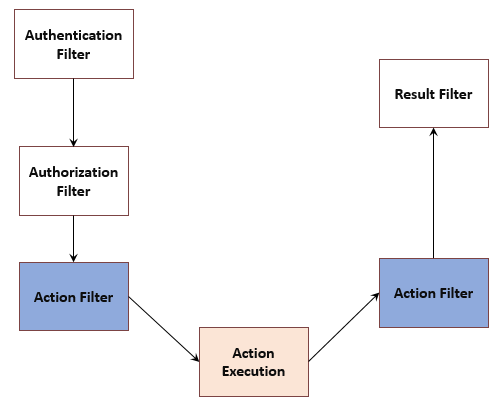
There are 5 basic types of filters,

Authorization filters
  • Runs first, before any other filter or action method. 
  • Implements IAuthorizationFilter.
  • Makes security decisions about whether to execute an action method such as performing authentication or validating properties of the request. 
  • AuthroizeAttribute class and RequireHttpsAttribute class are examples of an authorization filter. 
Action filters
  • Runs before and after the action method. 
  • Implements IActionFilter
  • IActionFitler declares two methods
    • OnActionExecuting : runs before the action method
    • OnActionExecuted: runs after the action method
Result filters
  • Runs before and after the action result is executed
  • Implements IResultFilter 
  • IResultFilter declares two methods
    • OnResultExecuting : runs before the ActionResult object is executed
    • OnResultExecuted: runs after the result and perform additional processing of the result such as modifying the HTTP response
  • The OutputCacheAttribute class is an example of a result filter (implementation,  web farm limitations)
  • Extending ASP.NET MVC OutputCache
Exception filters
  • Runs only if another filter, the action method or the action result throws an exception
  • Implements IExceptionFilter
  • Execute if there is an unhandled exception thrown during the execution of the ASP.NET MVC pipeline. 
  • Can be used for tasks such as logging or displaying error page
  • HandleErrorAttribute class is an example of an exception filter (article). Usually HandleError is added to global filters in MVC projects.
Authentication filters (New in ASP.NET MVC 5, article)
  • Implements IAuthenticationFilter
  • Applied prior to any Authorization filter
  • You have two methods to implement
    • OnAuthentication(AuthenticationContext filterContext)
    • OnAuthenticationChallenge : runs after OnAuthentication. You can perform additional things here


Controller class implements each of the filter interfaces (IActionFilter, IAuthenticationFilter, IAuthorizationFilter, IResultFilter). All above Attributes implements abstract FilterAttribute base class, which then again implements Attribute class. AuthorizeAttribute and HandleErrorAttribute contain useful features you can use without creating derived class.

AuthorizeAttribute Class
  • When you mark an action method with this, access to the action method is restricted to users who are authenticated and authorized.
  • Use AllowAnonymousAttribute attribute to specify that a particular action method is not restricted to only authroized users.
  • Use Roles and Users properties to specify which roles or users are permitted
  • If unauthorized user tries to access MVC framework returns a 401 HTTP status code
  • If you derive from the AuthorizeAttribute class, the derived type should be thread safe. Therefore do not store state in an instance of the type itself. Instead, store state per request in the Items property which is accessible through context objects passed to AuthorizeAttribute.
  • See examples here

Tuesday, July 3, 2012

Generics in C#

Introduced in .NET 2.0, Generics introduced type parameters to the framework. Generics makes it possible to design classes or methods to defer the specification of types until the class or method is declared and instantiated by the client code. 


Generic types combines reusability, type safety and efficiency when compared to non-generic counterparts. Generics are frequently used with collections.

You can check if a type is of generic type using Type.IsGenericType property.


Benefits

Before generics, generalization in C# was achieved by casting types to and from Object type. But using generics you can assure type safety at compile time. 

With generics, you don't have to box unbox types as we used to do with ArrayList in .NET 1.0


Benefits of Generics

Generic type parameters ##

It is a placeholder for a specific type the client specifies when instantiating a generic type. 

Generic Classes
Encapsulate operations that are not specific to a single data type. Are commonly used with collection classes. 

Difference between Generic type and Generic type definition
  • Generic type definition : List<T>
    • T is called Generic Type Parameter
  •  Generic type : List<string> 
Constraints on generic type
https://msdn.microsoft.com/en-us/library/d5x73970.aspx

System.Collections.Generic namespace

Contains useful generic collections. 
  • Dictionary
  • LinkedList
  • List


Saturday, June 16, 2012

Tuesday, June 12, 2012

All about C Sharp

Basics
Structs and classes
Modifiers
Enums
Abstract
Interfaces
Constructors

Generics

Delegates and Events


Lambda expressions
Nullable types
Dynamic binding
Attributes

Globalization
String and text hanlding
Dates and times

Collections
LINQ
 XML
Disposal and Garbage collection
Threading
Streams and I/O
Networking
Dynamic programming
Security
Advanced threading
Parallel programming
COM
Regular expressions


Reflection
Serialization
Tips and tricks
Interesting things

http://www.amazon.com/C-5-0-Nutshell-Definitive-Reference/dp/1449320104/ref=sr_1_1?ie=UTF8&qid=1418552522&sr=8-1&keywords=c+sharp#reader_1449320104

Sunday, May 20, 2012

Federated Identity

Single Sign On (SSO) allows users to access multiple services with a single login. 

Federated Identity refers to where the user stores their credentials. Also Federated Identity can be viewed as a way to connect identity management systems together. 

Claim based Authentication
Claim based authentication for dummies (SO)
Claim based architectures
Claim based identity model 


Resources
http://security.stackexchange.com/questions/13803/what-is-single-sign-on-versus-federated-login
http://en.wikipedia.org/wiki/Federated_identity
http://en.wikipedia.org/wiki/Claims-based_identity

Saturday, April 14, 2012

HTTP Modules

HTTP module is an assembly which gets called for every request made to the application. You can use these to customize and extend ASP.NET request pipeline. HTTP Modules are similar to ISAPI filters in that they run for all requests.

ISAPI filter : Internet Server API (Read more here)

You can work on this example to see how HttpModule works.

Typical usage

  • Security : because you can examine each request, your HTTP module can perform custom authentication or other security checks before the requested page, XML Web service or handler is called
  • Statistics and logging: gather information in central place rather than on each page
  • Custom headers or footers : Because you can modify the response you can inject content 
HTTP Modules differ from HTTP handlers. While module get called for all requests and responses, Handlers run only in response to specific requests.(MSDN)

HTTP handlers
This is the process which runs in response to a request made to an ASP.NET web application. More info.

Using IHttpHandler interface, you  can write custom HTTP handlers to process specific types of HTTP requests. It provides functionality much like ISAPI filters but in a more simpler way. 

The most common HTTP handler is ASP.NET page handler which processes your request for .aspx pages. 

Also see ihttphandler vs ihttpmodule

Resources


Saturday, April 7, 2012

Introduction to RequireJS


To do modular programming you can use RequireJS. It is a JavaScript file and module loader. 
  • Loads all codes relative to a baseUrl
  • With paths config you can setup locations of a group of scripts
  • You can define modules in RequireJS in few different ways
    • Simple name/value pairs
    • Definition functions
    • Definition functions with dependencies
    • Define module as a function
    • Define a module with a name
  • Only one module should be defined per JavaScript file
  •  Normally you should not need to use require() to fetch a module, but instead rely on the module being passed in to the function as an argument.
  • You can use global function requirejs.undef() to undefine a module
  • RequireJS loads each dependency as a script tag, using head.appendChild()


loading text resources using text plugin

You can use text plugin to load text resources. 

Resources

Tuesday, January 17, 2012

Closures in JavaScript

Closures are not hard to understand once you understand the core concept behind it. You won't understand it better if you read academic papers or anything like that so lets start by looking at some examples. 

Most basic closure example

Here func1 creates local variable name and a function. the function doesn't have a local variable but reuses the variable defined in the parent function. 


In the func2 there's a slight difference. Unlike in func1 here you return the displayName function. so in the displayName function definition gets assigned to the variable myFunc. But it also alerts 'Chrome' which was not a local variable to the displayName function.

You'll see Chrome in the alert is because displayName has become a closure. Closure is a special kind of object which combines

  1. a function
  2. and the environment in which that function was created (environment consists of local variables that were in-scope at that time)
The environment consists of any local variable that were in-scope at the time that closure was created. It will be kept alive even after the function returns. In other words, whenever you see a function keyword within another function, the inner function has access to the variables in outer function. It's a stack-frame which is not de-allocated when the function returns. The local variables are not copied, they are kept by reference.


Closures in practice


Closures can be used to different things. You can emulate private methods using closures (module pattern)


Creating closures in loops


You must be careful when creating a closure inside a loop. Read more about it here at MDN article. Stackoverflow


Performance considerations

Creating closures will have some impact on the script performance from processing speed and memory consumption. When creating new object/class, methods should normally be associated to the object prototype rather than defined into the object constructor. This is because whenever constructor is called, the method will get reassigned for every object creation. (However redefining the prototype is not recommended). 

Closure vs object performance (marijnhaverbeke)

Resolving this with Closures

sources:

Thursday, January 12, 2012

MVC Framework and Application structure

ASP.NET MVC is an open source web application framework. MVC uses the ASP.NET routing engine, which provides flexibility for mapping URLs to controller classes. 

MVC does not use ASP.NET Web forms post-back model for interactions with the server. Instead, all end-user interactions are routed to a controller class. It Maintains separation between UI logic and business logic and helps testability. As a result, ASP.NET view state and ASP.NET web forms page life-cycle events are not integrated 

With MVC based views. Routes are initialized in the Application_Start method of Global.asax file


from MSDN
    Global.asax file
    • Also known as ASP.NET application file. This file is optional
    • Resides in the root directory
    • Derived from HttpApplication class

    HttpApplicationState (implements NameObjectCollectionBase)

    You can use HttpApplicationState to share global information across multiple sessions and requests. 

    A Single instance of an HttpApplicationState class is created first time a client requests any URL resource within a particular ASP.NET application virtual directory. A separate single instance is created for each ASP.NET application on Web server. Reference to each instance is then exposed via the Application object. 

    You can access this via HttpContext.Application property. (In MVC 3 like this). You can use this to store application data that does not change typically. But sometimes it is better not to use this in case you want to access data outside the ASP.NET request pipeline (see this). 

    Application state is not shared across either a Web farm or a Web garden


    Future of ASP.NET 

    In the latter versions of ASP.NET, ASP.NET MVC, ASP.NET Web API and ASP.NET Web Pages will merge into a unified MVC 6. This is also known as ASP.NET vNext. 


    Resources

    Saturday, January 7, 2012

    What you need to know about REST

    If you're in software industry you surely have heard about REST. You might not know what it actually even means but you might know its about designing an API to consume network calls.

    Representational state transfer protocol (REST) is an architectural style for designing networked application using simple* HTML protocols. REST relies on stateless, client-server architecture. You can think of it as a light weight web service. It is platform and language independent protocol.

    Difference between SOAP and REST


    Designing REST API

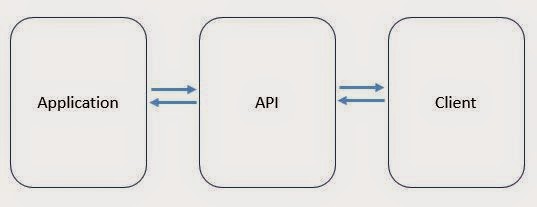
    APIs exposes functionality of an application or a service.


    * : I used simple with comparison to CORBA, RPC and SOAP which are bit complex to implement nowadays.

    COAP (COnstrained Application Protocol)
    Protocol intended to use in simple electronic devices that allow them to communicate over the internet. It's an application layer protocol. It uses UDP protocol (Check difference between TCP and UDP)
    http://www.slideshare.net/jvermillard/co-ap

    Sources

    Designing REST APIs
    The Increasing importance of APIs in web development 
    Web API growing trends 
    http://stackoverflow.com/questions/7551/best-practices-for-securing-a-rest-api-web-service


    last updated October 2014
    Powered by Blogger.


    Software Architect at Surge Global/ Certified Scrum Master

    Experienced in Product Design, Software Engineering, Team management and Practicing Agile methodologies.

    Search This Blog

    Facebook