Showing posts with label azure. Show all posts

Sunday, January 31, 2021

When to use Azure Landing Zones

Azure Landing Zones allows you to migrate applications, modernize and innovate at Enterprise scale. It gives you few different ways to adopt your existing application structure to Azure cloud. It's coupled with Microsoft Cloud Adaption Framework making sure the standards are meet. 

Below are few different resources to understand more on Azure Landing Zones.


https://medium.com/azure-architects/azure-landing-zones-scenario-walkthrough-f38596092fdc

https://docs.microsoft.com/en-us/azure/cloud-adoption-framework/ready/landing-zone/terraform-landing-zone


Monday, July 1, 2019

SQL Databases in Azure

Azure SQL is database-as-a-service. It is high performance, reliable and secure cloud database. Azure SQL can be purchased as Virtual Core based or Database Transaction Unit (DTU) based purchasing models. 

Azure also supports Geo replication for disaster recovery up to 4 instances. Pricing is same as for the primary database.


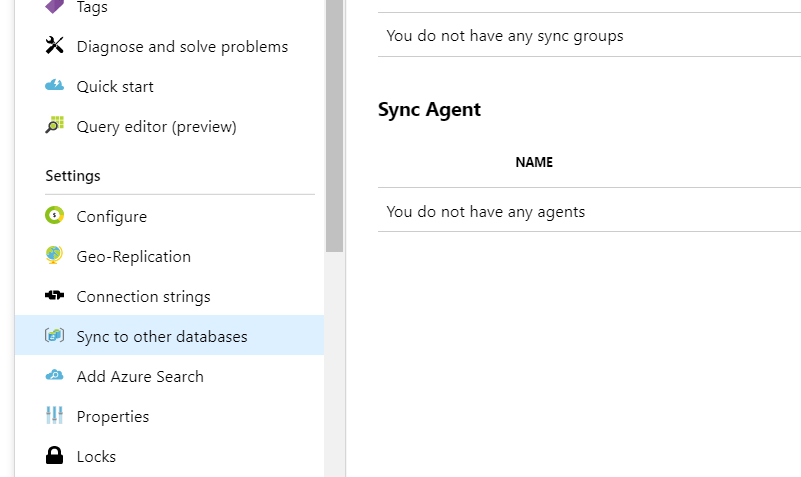
Data Sync in Azure SQL Databases

With Azure SQL you can synchronize with other databases. This is achieved via Azure SQL Data Sync option.


Improving Performance in Azure SQL

Intelligent Insights can be used to identify and troubleshoot Azure DB performance issues. Locking is a typical situation occurs in SQL databases (See finding locking queries in Azure SQL) Other than that 

  • Reaching resource limits
  • Workload pressure 
are some performance issues which could occur in Azure SQL. 


Securing resources in Azure SQL

Using features like Advanced data security and Dynamic data masking you can improve the security of your data. Dynamic data masking limits sensitive data exposure by masking them to non-privileged users. 

Advanced data security gives you recommendations on database administration. It analyzes and tells you what fields can be classified as well as runs vulnerability tests and gives recommendations. 


Monitoring Azure SQL Database

Database admins can setup alerts in Azure SQL to identify anomalies. There are lot of settings you can define using Azure SQL Alerts. 

Monday, February 4, 2019

Web App Deployment in Azure


Azure App Service Web Apps (or just Web Apps) is a service for hosting web applications, REST APIs, and mobile back ends.

Web Apps has,
You can also take advantage of its DevOps capabilities, such as continuous deployment from Azure DevOps, GitHub, Docker Hub, and other sources, package management, staging environments, custom domain, and SSL certificates.

You can scale up or out manually or automatically. App services are ISO, SOC and PCI compliant.

In Azure apps runs in an App Service plan. It defines set of compute resources for a web app to run. These resources are much analogues to a server farm.

Pricing tiers (Hosting plans in depth)

Shared compute (Free and Shared): Runs on same Azure VM as other App service apps. These resources cannot scale out- Intended only for development and testing

Dedicated compute (Basic, Standard, Premium and Premium V2) runs on dedicated Azure VMs. Only apps in same App Service plan share the same compute resources. Higher the tier, the more VM instances are available to you for scale-out

Isolated : Runs on dedicated Azure VMs on dedicated Azure Virtual Networks, provides network isolation on top of compute isolation to your apps. Provides maximum scale-out capabilities.

Consumption: Only available for function apps. Scales the functions dynamically depending on the workload.

Except Free and Shared tiers (which cannot scale out), if multiple apps are in same App Service plan, they all share same VM instances.

Azure - Comparison of Web hosting options

Azure offers several ways to host web sites: Azure App Service, Virtual Machines, Service Fabric, and Cloud Services. Azure even supports Azure dedicated hosts where you can configure to use a single physical machine for all your applications and servers in Azure.
https://docs.microsoft.com/en-us/azure/app-service/choose-web-site-cloud-service-vm

Deploying Web Apps from Visual Studio

You can directly publish to Azure Web App from Visual Studio using publish tool. When you give azure subscription details and web app you want to publish to, Visual Studio will directly publish the files to the web app. Kudu is the engine behind git deployments in Azure.

If you had hosted a web app with a previous version, when upgrading you'll run into Cannot find compilation library issue which can be solved by clearing wwwroot folder. 

Azure Web Apps carries capability to scale up (More CPU, memory disk space) as well as Scale out (Increase number of VM instances).

Monitoring Web Apps in Azure

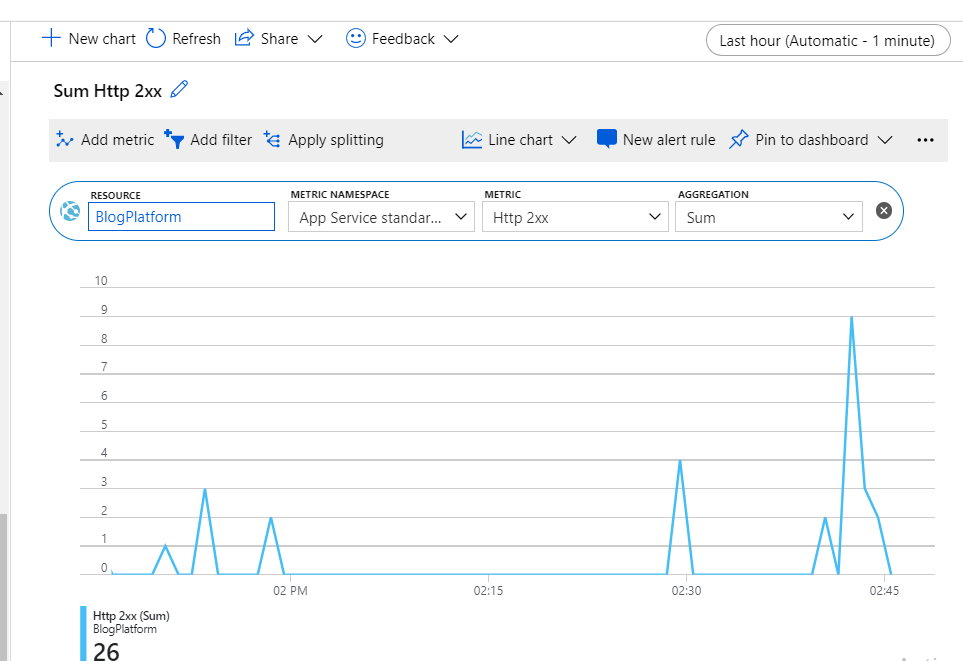
There are few tools Azure provides to monitor web apps in Azure. You can define rules which gets triggered based on a condition such as spikes in request count, CPU usage etc.


You can also monitor Metrics in Azure. It gives real-time overview of how the application behaves in different metrics.


Logs are important in any web application to see what kind of errors, warnings applications gives when running. App service logs and Log stream helps you seeing these. You can configure these in App service logs to view in Azure itself via. Log stream or upload it to storage of file system.


Process explorer is not frequently used feature which enables us to see currently running processes.

Running Performance Tests in Azure Web Apps

Azure Web Apps allows you to run performance tests.


But theses performance tests are now deprecated. There are few reasons why cloud based load testing is reaching end of life due to how practical and pragmatic load testing are. Therefore performance tests in Azure is reaching end of life.

Deciding correct Azure compute service


Web Apps in AWS - EC2

AWS carries option of Amazon EC2 for app deloyment. You can deploy ASP.NET Core 2.0 apps in AWS. 
Saturday, November 10, 2018

Overview of Azure Storage


Azure storage provide cloud storage that is highly available, secure, durable, scalable and redundant. It includes,
  • Azure Blobs (objects)
  • Azue Data Lake Storage Gen 2,
  • Azure files
  • Azure queue and
  • Azue tables

Blobs - Scalable object storage in Azure

Blob storage is a massively scalable object storage for unstructured data such as images, videos, audio, documents etc. These objects can be stored in hot, cool or archived tiers depending on frequency of access. 


  • Hot storage: For frequent access
  • Cool storage: Infrequent access
  • Archive for rarely accessed data
  • Premium tier (new) : Low latency accessed data

Storage account

All access to data objects in Azure Storage happens through a storage account. It contains all your Blobs, files, queues, tables and disks. There are few options like General purpose V1, V2 and Blob storage. Azure recommends V2 for most scenarios. You can always upgrade from V1 without any downtime.

All data in storage account is encrypted on server side using 256-bit AES encryption. Encryption does not affect Azure Storage performance. By default access is allowed only to the account owner. You can control this with Azure AD, shared key authentication etc. 

You can define CORS urls in Azure for storage accounts. 

Container


A container organizes a set of blobs, similar to a folder in a file system. All blobs reside within a container. A storage account can include an unlimited number of containers, and a container can store an unlimited number of blobs.

Blob

  • Block blobs store text and binary data
  • Append blobs are made up of blocks like block blobs, but are optimized for append operations. Append blobs are ideal for scenarios such as logging data from virtual machines
  • Page blobs store random access files up to 8 TB in size. Page blobs store the VHD files that back VMs
There may be times where large data-sets and network constraints make uploading data to Blob storage over the wire unrealistic. You can use Azure Data Box Disk to request solid-state disks (SSDs) from Microsoft. You can then copy your data to those disks and ship them back to Microsoft to be uploaded into Blob storage. (Covered below)

To ensure your data is durable azure storage replicates multiple copies of data. You can select from following options for this,
  • Locally redundant storage (LRS)
  • Zone redundant 
  • Geo-redundant
  • Read access Geo redundant

Getting started is very easy, as mentioned in Microsoft docs tutorial, Clone the git repo. Set the connection string of your storage account and run. It will do,
  • Create Blob container under selected account
    • Get a reference to blob container 
    • Set access to public
  • Create a file in local environment
  • Get a reference to block Blob 
  • Upload created file to block Blob
  • List all block Blobs
  • Download uploaded file

Little bit more on Amazon S3, 
There are many many large companies which uses Amazon S3, one of them is Netflix (Why Netflix migrated to AWS). Netflix even have geographically redundancy of there servers.  There are other popular clients like Airbnb which uses Amazon S3 for storage.

Azure Files


Offers file shares in cloud accessible via standard Server Message Block protocol. Azure files can be used to,

  • Replace on-premise file severs
  • Lift and Shift (strategy for moving an application or operation from one environment to another – without redesigning the app) applications
More reads,

Azure Data Lake


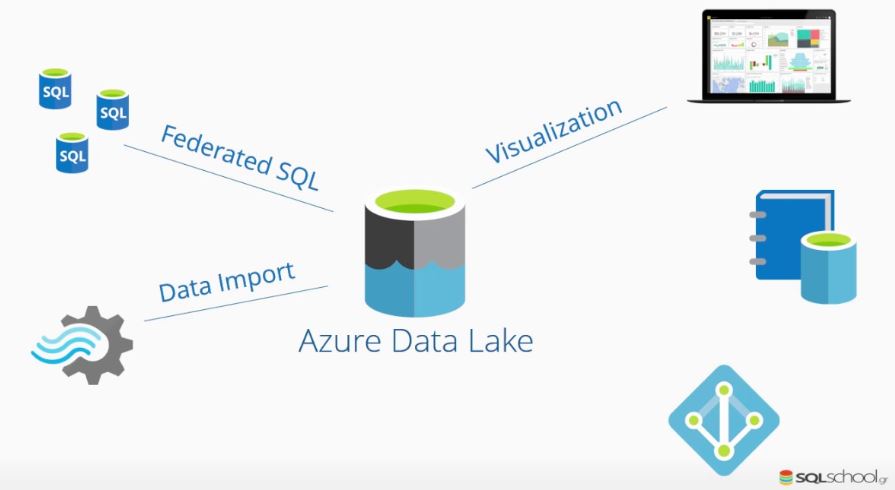
Data lake is a storage repository, usually in Hadoop, that holds a vast amount of raw data in its native format until it is needed (Why use a data lake). It is a central repository allows you to store all your structured/unstructured data at any scale. You can run analytics from dashboards, visualize for big data processing and machine learning for better decisions. (Best Practices, Azure Data Lake Storage Gen1 vs Azure Blob Storage, Azure vs AWS)


Azure Queue Storage


Provides asynchronous cloud messaging between app components. Single queue message can be up to 64KB in size and a queue can contain millions of messages. 

Common usage include
  • Creating a backlog of work to process asynchronously
  • Passing messages from an Azure web role to an Azure worker role

Another alternative to queue storage is to use Service bus (Comparison) which is more enterprise. There is no direct alternative to Service bus in Amazon but Amazon got Simple Queue Service (SQS) for the same purpose. Google cloud got Cloud Pub/Sub.

Azure CosmosDB (Alternative to Table Storage)


Table storage is a NoSQL key-value store for development using datasets. It uses JSON to serialize data and can perform OData-based queries. But as an alternative Azure Cosmos DB can be used to achieved for same purpose. It offers throughput-optimized tables, global distribution and automatic secondary indexes. (Azure table storage vs CosmosDB Table API). Azure CosmosDB is a very secure database.

Alternative to CosmosDB in AWS is DynamoDB (See a comparison). 

Azure Data Box


Is a on-premise offline physical box which can be used to transfer TBs of data between your offline premise to azure cloud more easily when busy networks aren't an option.

Data box accommodates both offline and online (Creates a link between your site and azure) scenarios.

Case Study

Cloud Storage options in AWS

AWS also has many cloud storage options. It has many options which is highlighted in the following article. Cloud Storage options in AWS. 

Cloud Storage AWS vs Azure

It's natural for us to compare what other options are there compared to Azure. While going through the options available in both AWS and Azure. Here's a comparison of both the platforms. 

Further reads,


Thursday, November 8, 2018

Tuesday, July 3, 2018

Organizing Resources in Azure with Resource Manager

When working with large scale projects proper organization of resources is a necessary. Azure has resource groups for grouping resources as required.

Resource Manager in Azure

You can use resource manager to organize resources within a subscription. Use it to control access, audit and tagging resources. Actions you take in azure are handles through resource managers. 


Following is how azure structure can be seen from scope prospective 


Template deployment in Azure Resource Manager

In large scale deployments you can use azure templates for automate tasks. Templates are simply JSON files containing metadata about the resources.


Integrating Azure Key Vault in Azure Resource Manager template deployment

You can pre-store the password in an Azure key vault and then customize the template to retrieve the password from the key vault during the deployment. Check this tutorial.

Resource Access Management in Azure


Friday, June 15, 2018

Internet of Things

IoT, Internet of Things is a system of interrelated computing devices which communicates over a network and can be remotely monitored.

Image Credits: Embitel India 
Some of the key goals of IoT is to,

  • Improving business processes
  • Improving customer experience
  • Reducing costs
  • Increasing competitiveness
Some of the challenges in IoT are,
  • Data/network security
  • Integrating with business processes
  • Expected ongoing costs
  • Upfront capital investment requirements
  • Integrating with existing ICT infrastructure

Edge Computing

Edge computing is the practice of processing data near the edge of your network, where the data is being generated, instead of in a centralised data-processing warehouse. (Microsoft Azure enables a new wave of edge computing. Here’s how.)


Tuesday, March 13, 2018

Serverless Computing - Azure Functions

In Serverless computing cloud provider provides backend as a service. The architecture is inherently scalable, can be deployed quickly. But comes with a cost such as testing and debugging. 

Azure Functions is the implementation in Azure. Azure functions can be integrated with Cosmos DB, Service bus and Storage.

Serverless APIs with Azure Function Proxies

Azure functions can be used to host an API. Not very often you host APIs in Functions. But this s a good way for scalability, costs or ease of implementation.

Cloud Messaging in Azure

You can enhance the behavior in Azure by using following

Event Grid

Fully managed event routing services by connecting serverless logic to events.


Service Bus

Messaging infrastructure in Azure.


Logic Apps

Helps you to provide workflows allowing developers to integrate data with their apps.

Analytics

Azure Stream Analytics allows you to query data in SQL like language

Serverless computing in AWS


Resources

https://azure.microsoft.com/en-us/services/functions/

Monday, July 3, 2017

Introduction to Azure Search

Azure search is simply a cloud service which gives developers an API for rich search experience. It executes queries over a user-defined index.

Azue search supports,

  • Search data from multiple content types and platforms
  • AI powered indexing to extract text from image files or key phrases from raw text
  • Create search experience with filters, synonyms, auto-complete and text analysis for "did you mean" auto correct search terms
  • Geo-search for find near me.
Functionality is exposed over a REST API or .NET SDK.  

Azure search comes with following features

  • Full text search and text analysis
  • Cognitive search (in preview)
  • Data integration
  • Linguistic analysis
  • Geo-search
  • User experience features
  • Relevance
  • Monitoring and reporting
  • Tools and prototyping and inspection
  • Infrastructure

Steps to use
  • Provision service
  • Create index
  • Load Data
  • Search

Indexer
Indexer is a crawler that extracts searchable data and metadata from a external Azure data source and populate index based on field-to-field mapping between indexer and data source.

Connecting Azure Search with Azure SQL Database
https://docs.microsoft.com/en-us/azure/search/search-howto-connecting-azure-sql-database-to-azure-search-using-indexers


Tuesday, January 31, 2017

Getting Started with Azure CDN

For a better user experience and a faster delivery of content from server to client, both caching and CDN (content delivery network) comes hand in hand. When considering performance it is important to use both of  these techniques for better user experience (See Caching vs CDN - Stackoverflow).

CDN can be used to cache static web content to provide content faster to end users. It caches content in physical nodes across the globe.

Watch this video to understand how to link a storage account with Azure CDN.


Resources
https://azure.microsoft.com/en-us/blog/enabling-cdn-for-azure-websites/
https://docs.microsoft.com/en-us/azure/cdn/cdn-create-new-endpoint

Wednesday, January 1, 2014

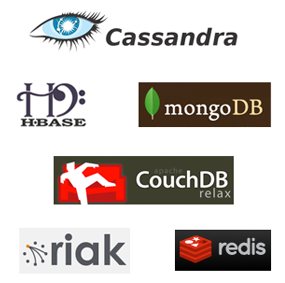
NoSQL databases


NoSQL provides an alternative way for storage and retrieval of data for relational databases. 

NoSQL has,

  • a massive write performance compared to relational DBs
  • faster Key-value access
  • Due to its lack of structure, flexible schema and data types
  • Can use right data model for right problem with different data models and many.

 Usually NoSQL databases can be categorized into, 

  • Document databases
  • Graph stores
  • Key-value stores
  • Wide-column stores

The intention to use NoSQL databases is things like horizontal scalability, simplicity of design and fine control over availability. 


Practical use cases for NoSQL databases

  • Syncing online-offline data
  • Fast response time under loads
  • Avoids heavy joins
  • Dynamic table creation
  • Hierarchical data like threaded discussions and parts explosion
  • Voting systems
  • Archiving and many

Guide to selecting the No SQL database


Concepts you need to know in NoSQL

MapReduce (link)
Programming model and an associated implementation for processing and generating large data sets. 

NoSQL databases and technologies


Apache CouchDB (link)

Uses JSON for documents, JavaScript for MapReduce indexes and regular HTTP for its API. 

Couchbase (link)

MongoDB (link)


Amazon DynamoDB - NoSQL in AWS (link)

DynamoDB is a key-value and document database in AWS. 

Cosmos DB - Implementing No SQL in Azure (link)


Built with global distribution and horizontal scale in focus. Key capabilities include,
  • Global distribution: Distribute data into any number of Azure regions ensuring lowest possible latency
  • Supports multiple data models with APIs for,
    • SQL
    • MongoDB
    • Cassandra 
    • Table etc.
  • Elastically and indepedently scale throughput and storage on demand and worldwide
  • High responsive and mission-critical support
    • Guarantees end-to-end low latency at 99th percentile to its customers

NoSQL resources

http://nosql-database.org/

Updated : June-2019

Powered by Blogger.


Software Architect at Surge Global/ Certified Scrum Master

Experienced in Product Design, Software Engineering, Team management and Practicing Agile methodologies.

Search This Blog

Facebook