Showing posts with label JavaScript. Show all posts

Tuesday, October 17, 2017

Hoisting in JavaScript

Due to it's somewhat awkward behavior, concepts in JavaScript is little tricky to understand. Hoisting is one of them. Hoisting can be divided in to two. Variable hoisting and function hoisting. We'll first look at variable hoisting.


Variable hoisting


If you execute below line you'll get a ReferenceError.


This is because definition for value1 is not exist. Now consider below.


Even though value1 is defined after line1, still it'll say value1 is undefined. But won't show the value. This is because JavaScript interpreter goes through the file and "hoist" the variable definitions on top of the function. But value assignment happens later.

you must have expected var1 to print 1 since it was defined in the outer scope. But due to function hoisting and functional level scoping it will print undefined. But since var2 doesn't exist in current scope, it will get value 2 and print it. This is the reason it's recommended to declare all variables on top of a function.


Function hoisting


Unlike variables, functions doesn't just hold the function name, it holds the actual function definition.


something to remember is that function hoisting happens only for function defintions. Not function expressions.

Here the variable func2 will be defined but not the function definition. (TypeError). JavaScript only has function level scoping.

function declarations and variable declarations are always moved('hoisted') invisibly to the top of their containing scope by the interpreter. Function parameters and language defined names.


Resources

http://www.adequatelygood.com/JavaScript-Scoping-and-Hoisting.html

Saturday, February 7, 2015

Introduction to ReactJS


React is a JavaScript library developed by Facebook. ReactJS focuses on,
  • UI : Use React as the V in MVC
  • Virtual DOM : DOM diff implementation for high performance
  • Data flow : Offers reactive data flow
React is all about building reusable components. (Why Facebook built react). It doesn't manipulate DOM unless it needs to (check react displaying data example). It uses a fast, internal mock DOM to perform diffs and computes the most efficient DOM mutation for you. React components can only render a single root node. If you want to return multiple nodes they must be wrapped in a single root. Why React's Virtual DOM concept is more efficient than dirty model checking. Also check how Virtual DOM and diffing works in React.

Why use Reactjs


Here's a simple hello world example. Here, React.createClass will create a Component. (Read more)

var App = React.createClass({
            render: function () {
                return React.DOM.h1(null, "Hi there");
            }
        });
React.render(App(), document.body);

JSX

React believes components are the right way to separate concerns rather than using templates. JSX enables you to create JavaScript objects using HTML syntax.

const element = <h1>Hello, world!</h1>;

JSX is similar to HTML, but not exactly the same. See JSX Gotchas and JSX in depth. You don't have to use JSX with React. You can just use plain JS. However, we recommend using JSX because it is a concise and familiar syntax for defining tree structures with attributes.

JSX elements gets converted to react elements with Babel. Same as what you create using React.createElement method. Therefore you can only have single root tag for a JSX statement.

React can either render HTML tags (strings) or React components (classes). React JSX transforms from an XML-like syntax into native JavaScript. 


Components and Props

Components let you split the UI into independent, reusable pieces, and think about each piece in isolation.

Conceptually, components are like JavaScript functions. They accept arbitrary inputs (called “props”) and return React elements describing what should appear on the screen.

Loading Ajax data using JQuery

In Load Initial Data via AJAX example, you can see how to load data from ajax call and show them in the browser. We use JQuery here to make things easier. Typical error you'll get when implementing is mountNode is not defined error.

React integration with C# and ASP.NET MVC

You can use ReactJS.NET to integrate your .NET application easily. Take a look at this sample tutorial.


What is Flux

Architecture Facebook uses internally when working with react. It is now recommended to use Redux over Flux

https://scotch.io/tutorials/getting-to-know-flux-the-react-js-architecture
http://facebook.github.io/flux/docs/overview.html
http://facebook.github.io/flux/
https://www.youtube.com/watch?list=PLb0IAmt7-GS188xDYE-u1ShQmFFGbrk0v&t=621&v=nYkdrAPrdcw


Why use Redux

Redux has many benefits. Simply Redux is a state management tool. It is a very lightweight library which can be used with many JavaScript frameworks. 

Simply Redux keeps state of your application in a store. Each component can access any state that is needed from the store. So why use Redux? As React is based on components, these needs to communicate with each other. Redux helps you by keeping it in a central location. 

Redux has three building parts: actions, store and reducers.
  • Actions are events: They are the only way you can send data from your application to your Redux store. The data can be from user interactions, API calls or even form submission.
  • Reducers: Reducers are pure functions that take the current state of an application, perform an action and returns a new state.
  • Store: The store holds the application state. There is only one store in any Redux application.

Saturday, August 2, 2014

Execution Context Best Practices in JavaScript


In this article we'll see what this means, and places where this is applicable. 
We'll also look at how to manipulate this with built-in functions like 
apply, call and bind.

Every JavaScript statement is executed in one execution context or the other. In it's simplest terms this refers to the "owner"  of  the function we currently executing. this helps us to get the object or the execution context we are currently working with.

In the above example both func1 and func2 returns this. because f1 was called (executed) inside the window (or global context) func1 returns window. In f2 we are using strict mode. In strict mode, this will be whatever it's set to when entering the execution context. Since we have not defined this, it will remain undefined. We can set that to any value we want. Even null. 

Monday, March 10, 2014

Deferred in JQuery

Web applications are kept alive by data. These data usually retrieved from data sources. AJAX (Asynchronous JavaScript and XML) is a technique used to communicate with web servers to send and receive data asynchronously. Often you'll send a ajax request, wait for data to come inside callbacks and execute rest of the flow. Ajax uses XMLHttpRequest object to communicate with server side.


XMLHttpRequest object
Is used to exchange data between client and server. Using this you can update web pages without reloading or send data to server in background.

Below is how you can create a simple ajax request using jQuery. You can pass object to as a parameter which contains settings for the ajax request. jQuery.ajax() will return a jqXHR object. jqXHR is a superset of native XMLHttpRequest. As of jQuery 1.5, jqXHR object implements the Promise interface.

There are variety of options you can use to customize the ajax requests.


Also you can use jQuery.ajaxSetup() to set defaults for future Ajax requests but using this not recommended.

When you have multiple ajax requests to send you'll need some mechanism to chain them to have correct sequencing you desire. Also you'll need to make the requests asynchronously to make browser not getting freezed (you can make Ajax requests synchronous but it is not advisable). in jQuery you can use Deferred for this.

Saturday, March 1, 2014

Performance tuning JavaScript

In this article we'll look at what is performance
why it is important, different ways of tracking performance issues 
and ways to solve them.


What and why performance is important?


Performance tuning is very important when an application gets larger. But it can be very crucial to retain the value of the software. When developing JavaScript applications there are variety of tools which you can use to tune the performance of a web application.

Memory can be held by an object in 2 different ways. directly by the object itself or implicitly by holding references to other objects. 

Different types of performance issues exists!
Memory leaks 
Memory leak is a gradual loss of available computer memory. 

Identifying performance issues

Before do any kind of performance tuning you need to identify what are the performance issues I have. You can use different tools and mechanisms to identify existing performance issues like memory leaks. 

Using Chrome Developer Tools for profiling

Use timeline in Developer tools to do profiling. Start with reading this introduction

Things to take

Memory leaks in JavaScript is based on reference counting
See JavaScript memory profling with Google Chrome


Using timers

Measure time to execute a function (SO) 


Using Google Chrome
finding JavaScript memory leaks with Chrome (SO)

You can also use V8 benchmark suite to profile JavaScript performance and identity bottlenecks. Checkout this link for more information. 

Not only in Google Chrome, but there are tools available in other major browsers as well. 

Writing memory efficient code is another important thing. You can also optimize existing JavaScript code in different ways.

Memory management in JS
http://stackoverflow.com/questions/23506064/how-do-you-detect-memory-limits-in-javascript
http://stackoverflow.com/questions/2936782/javascript-memory-limit

Performance of popular JavaScript MVC frameworks
http://www.filamentgroup.com/lab/mv-initial-load-times.html

Tips from W3Schools
Best way to profile JavaScript execution DOM interaction is expensive
http://andyshora.com/how-bad-is-dom-interaction-javascript.html 
http://stackoverflow.com/questions/8750101/multiple-small-dom-operation-vs-one-large-dom-operation 
http://stackoverflow.com/questions/6022396/too-many-dom-elements?rq=1
http://www.stubbornella.org/content/2009/03/27/reflows-repaints-css-performance-making-your-javascript-slow/
https://developer.mozilla.org/en-US/docs/Web/JavaScript/Memory_Management
http://www.smashingmagazine.com/2012/11/05/writing-fast-memory-efficient-javascript/
 
image credit : devbridge


Wednesday, January 1, 2014

Introduction to Node.js

What is Node.js?

Node.js is a JavaScript run-time environment built on top of Chrome V8 JavaScript engine for building scalable network applications. It's written in C, C++ and JavaScript. Node.js uses event driven, non-blocking I/O model which is lightweight and efficient. Node.js has a package manager called npm.

Getting Started

First install Node.js. Then create a new folder and run npm init in Node.js command prompt. You'll be guided through a set of steps to create the folder structure. After this you'll have package.json file created for you.


In root, create index.js file and add console.log('Hello World'); if you run the node app now, you'll see Hello World in command prompt.


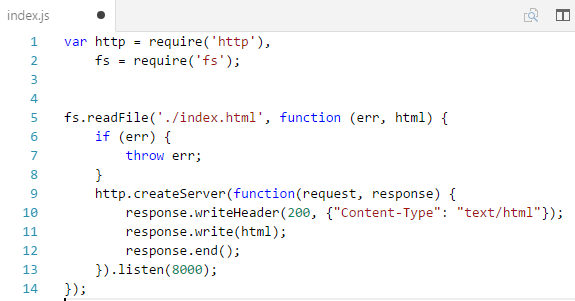
Create a index.html file with some content and add the following code to index.js file


Type http://localhost:8000/ in the browser and your Node server is up and running on port 8000.

Creating an REST API with Node and SQLite

Let's see how to create a simple REST API with Node.js. For database connectivity i'll use SQLite.

First install following node packages

  • SQLite3 for storage
  • Express.js web server to manage endpoints, requests and responses
  • md5 to hash passwords of users

Handling CORS(Cross-Origin Resource Sharing)

Due to CORS restriction, you cannot access the resources even in localhost from another application. We use cors package in npm and use it as an application level middleware to handle CORS. 

Here's code for server.js


This is the code for database.js where we define and initialize the database


Here in database file ':memory:' will initialize the database in memory.


When to use Node.js?


Node.js in production

Introduction to TypeScript

TypeScript is a superset of JavaScript. You can write code in TypeScript and compile it to JavaScript. It's an implementation done by Microsoft. 

Unlike JavaScript, TypeScript contains lot more usable features such as static typing, classes and interfaces. 


Resources


Cookies

Cookie is a small bit of text transferred between client and server. It contains information needed for the web applications. 
  • Most browsers support cookies of up to 4096 bytes. Most browsers allow only 20 cookies per site. Some browsers also put an absolute limit, usually 300. 
  • A cookie limitation that you might encounter is that users can set their browser to refuse cookies. Although cookies can be very useful in your application, the application should not depend on being able to store cookies. The browser is responsible for managing cookies on a user system. 
  • Cookies are sent to the browser via the HttpResponse object that exposes a collection called Cookies. You can also set a cookie's date and time expiration. Expired cookies are deleted by the browser. If you do not set the cookie's expiration, the cookie is created but it is not stored on the user's hard disk. Instead, the cookie is maintained as part of the user's session information. 
  • When the user closes the browser, the cookie is discarded. A non-persistent cookie like this is useful for information that needs to be stored for only a short time or that for security reasons should not be written to disk on the client computer. 
  • Cookies derives from a specialized collection of type NameObjectCollectionBase. You can also store multiple name-value pairs in a single cookie. referred to as subkeys. all cookies are sent to the server with any request to that site.
  • You can set the scope of cookies in two ways: 
    • Limit the scope of cookies to a folder on the server
    • Set scope to a domain
  • By default, cookies are associated with a specific domain
  • If the cookie does not exist, you will get a NullReferenceException exception if try to read it.
  • Notice also that the HtmlEncode method was called to encode the contents of a cookie before displaying it in the page. 
Deleting Cookies
You cannot directly remove a cookie because the cookie is on the user's computer. The technique is to create a new cookie with the same name as the cookie to be deleted, but to set the cookie's expiration to a date earlier than today.

//Setting a cookie
            HttpCookie cookie = new HttpCookie("cookie1", "cookieValue");
            cookie.Expires = DateTime.Now.AddSeconds(30);
            Response.AppendCookie(cookie);

//Reading cookies
            var cookie = Request.Cookies;
            string[] cookies = Request.Cookies.AllKeys;

            foreach (string cookie in cookies)
            {
                Response.Cookies[cookie].Expires = DateTime.Now.AddDays(-1);
            }

Security
You should never store sensitive data in a cookie. SSL does not protect the cookie from being read or manipulated while it is on the user's computer, but it does prevent the cookie from being read while in transit because the cookie is encrypted.

By default, ASP.NET uses a non-persistent cookie to store the session state. However, if a user has disabled cookies on the browser, session state information cannot be stored in a cookie.

ASP.NET offers an alternative in the form of cookieless sessions. You can configure your application to store session IDs not in a cookie, but in the URLs of pages in your site. If your application relies on session state, you might consider configuring it to use cookieless sessions. However, under some limited circumstances, if the user shares the URL with someone else—perhaps to send the URL to a colleague while the user's session is still active—then both users can end up sharing the same session, with unpredictable results.


HttpCookieMode
Specifies how cookies are used in the web application. It is used to specify cookieless attribute in sessionState configuration section. 
Link1 and MSDN 

Resources

Introduction to Grunt

Saturday, December 7, 2013

Performance considerations in KnockoutJS

For web applications performance is an important factor to consider. In KnockoutJS when you do things in the wrong way this matters. We'll see some key areas you need to consider about performance in KnockoutJS. 

First lets look at fundemental building blocks of KnockoutJS application

observables
most basic fundamental building block. You need to have these

observableArrays

subscribers
get notifications when observable gets changed. You can dispose these. Also you delay them in case of expensive updates.

computed observables
Observables which depends on other observables


Bindings in KnockoutJS


visible binding
set display none based on the value. So shouldn't cost much.

for 10,000 elements inside a foreach, ko if takes around 10 seconds while visible binding only takes 1 second.

foreach
duplicates section of a markup for each array entry. Could be a normal array . 

if
bit expensive because, not like visible binding, if will hide the content which is inside the tag

    <div data-bind="if: check">
        <h1>Inject this to DOM if check is true</h1>
        <h2>Otherwise this won't exist in the DOM</h2>
    </div>

the visible binding just uses CSS to toggle the container element’s visiblity. The if binding, however, physically adds or removes the contained markup in your DOM, and only applies bindings to descendants if the expression is true.

with
creates a new binding context. it'll add descendent elements dynamically.

If the expression you supply involves any observable values, the expression will be re-evaluated whenever any of those observables change. Then, descendant elements will be cleared out, and a new copy of the markup will be added to your document and bound in the context of the new evaluation result.


click


value


checked


template


custom bindings


Tuesday, October 22, 2013

Introduction to AngularJS

AngularJS is a pure JavaScript framework. It extends HTML attributes with Directives known as ng-directives. A very basic angular application looks like below,


Here we define the ng-app in which the angular code resides. We add ng-model directive to input for data binding and show it in curly brackets in mustache style in next line. (We usually define a model nested inside a controller. Since we have not done that here it resides in $rootScope). We'll look at some useful things comes in AngularJS next.

Directives (documentation)

These are markers on a DOM element that tells AngularJS's HTML Compiler ($compile) to attach specific behavior to that DOM element. Below are some directives which comes with AngularJS. There are quite a lot of directives comes with the library. You can also create custom directives.
  • ng-app : defines AngularJS application
  • ng-model : binds the value of HTML controls (input, select, textarea) to a property on the scope. 
    • Binds view to a model
    • Provides validation behavior
  • ng-bind : binds application data to HTML view. Tells angular to replace text content inside a HTML element with expression's value
Model Binding (ng-model)
This directive binds an form element to a property on the scope using NgModelController, which is created and exposed by this directive. 

Module

You can configure your module using this.
Constants in AngularJS. You can inject constants to a module.

Dependency Injection
https://docs.angularjs.org/guide/di

Controllers

AngularJS applications are controlled by controllers. Look at the below example,
\
Above MyApp is the name we gave  to the ng-app attribute. We define the controller (SubController) and put it inside the module. After that we can reference it from the DOM. Without adding the controller into the module, we can also keep it global and reference from DOM. but it is not a good practice. Controllers should not have any logic.  


Services

Service is a component that does a specific job like logging, timer etc. Services are wired using Dependency Injection. Services in AngularJS are,
  • Lazily initialized : Instantiated only when a component depends on it
  • Singleton: Components depends on the services gets a reference to the single instance of the service through a factory
To use a service you should add a dependency to that from your controller, service etc. Developers can also create there own custom services.

AngularJS provides services like $route, $window, $location etc. 

Factory

You can create service using Factory as well. Factory and Services are kind of same.

Application Structure and Code organizing

AngularJS projects can be structured in many different ways. Each carries there own pros and cons. It solely depends on what is your requirements are. Following are some useful articles for you to make the decision.  

http://stackoverflow.com/questions/17461242/angularjs-application-file-structure
http://cliffmeyers.com/blog/2013/4/21/code-organization-angularjs-javascript

Angular 1.4 and 2.0

Angular 2.0 is the rewritten version of Angular optimized for mobile and future browsers. It's yet to be released but you can take a look from https://angular.io/. See whats new in Angular 2.0 and this.

AngularJS 1.4 and 2.0 can exist within the same project. See how to do it.

Authentication

https://medium.com/opinionated-angularjs/techniques-for-authentication-in-angularjs-applications-7bbf0346acec

The calling order of AngularJS application (link)
  • app.config
  • app.run
    • you can use run block for authentication
  • directive's compile functions
  • app.controllers()
  • directive's link functions

Tips and Tricks

http://demisx.github.io/angularjs/2014/09/14/angular-what-goes-where.html
https://github.com/johnpapa/angular-styleguide

Resources

Saturday, August 24, 2013

Introduction to KnockoutJS

KnockoutJS is a JavaScript library of MVVM pattern with templates. It does not depend on jQuery. 

With KnockoutJS you can have,

  • Dependency tracking : Automatically update UI when model changes
  • Declarative bindings: Connect parts of your UI to your data model
  • Extensible: Implement custom behaviors

What is MVVM pattern

  • Model : objects and operations in your business domain, this is independent from the UI
  • View Model : Pure code representation of data and operations on a UI. No HTML
  • View: Interactive UI. Representing the state of the ViewModel
Here's a simple example of using KnockoutJS


To achieve two way binding you can use observables. When using observables when you update something in View, changes will be reflected in ViewModel as well.


Explicit subscribing

Used to get notifications when subscribed observable gets changed. You can assign the subscription to a variable and dispose it later.

You can force observables to notify subscribers always by using  
myViewModel.personName.extend({ notify: 'always' });

You can delay change notification by using 
myViewModel.personName.extend({ rateLimit: 50 });


Observable Arrays

Just like Observables but for arrays. Observable arrays only track which objects are in the array. Not the state of those objects. Observable array is actually an observable whose value is an array (with some additional methods). Check the documentation for other methods available. For the array also you can delay change notifications like for observables.


Computed observables (documentation)

functions that dependent on one or more other observables. Will automatically update when dependencies changes. You can also create writable observables. You can extend this by using rateLimit and notify attributes. 

See complete reference from documentation here


Writable computed observables (documentation

//see the documentation

Pure computed observables (documentation)

This was introduced in 3.2V. Use this if your computed do some calculation and simply returns a value. Here the evaluator does not modify other objects state).

This provides performance and memory benefits. Doesn't maintain subscriptions to its dependencies when it has no subscribers itself.


KnockoutJS - EcmaScript 5 Plugin


http://blog.stevensanderson.com/2013/05/20/knockout-es5-a-plugin-to-simplify-your-syntax/
https://github.com/SteveSanderson/knockout-es5

Monday, April 22, 2013

Templating with Mustache JavaScript

Mustache can be used to deal with templating. Not only in JavaScript, Mustache is available for many languages including Nustache for .NET and mustache sharp for C#.

There are other client side templating options available, such as HandleBars an UnderscoreJS. 

Why use client side JavaScript templating?
http://www.smashingmagazine.com/2012/12/05/client-side-templating/
http://en.wikipedia.org/wiki/JavaScript_templating
https://www.google.lk/search?q=why%20use%20client%20side%20templating

Resources


Saturday, December 8, 2012

Stuff you need to know about JavaScript

JavaScript has lot of concepts around it. There are things that you might miss out. Lets see some of them.

  • In JavaScript there are some variables starting as __ (__defineGetter, __defineSetter, __proto__). These are variables defined by the browser and are not defined by ECMAScript #convention (link2)
  •  Best practice to define libraries is to define one global variable (google, jquery) and define all your methods/variables within the scope of that object
  • JavaScript curry
  • Adding custom headers to JQuery AJAX request
  • Browser closing events
    • http://stackoverflow.com/questions/1119289/how-to-show-the-are-you-sure-you-want-to-navigate-away-from-this-page-when-ch
    • http://stackoverflow.com/questions/2076299/how-to-close-current-tab-in-a-browser-window
  • http://stackoverflow.com/questions/4869613/solutions-for-distributing-html5-applications-as-desktop-applications

Scope and Context in JavaScript

Saturday, November 10, 2012

JavaScript prototyping

In JavaScript, every object has a prototype property. Prototype property is also an object. All JavaScript objects inherit there properties and methods from there prototypes.

Using prototypes makes object creation faster.


When an inherited function is executed, the value of this points to the inheriting object, not to the prototype object where the function is an own property.

Object.create :  Create a new object with specified prototype object and properties

https://developer.mozilla.org/en-US/docs/Web/JavaScript/Guide/Inheritance_and_the_prototype_chain

hasOwnProperty is an own property of Object.prototype. When we create an object, it inherits hasOwnProperty from Object.prototype.

Arrays inherits from Array.prototype (it has methods like forEach, call)
// f ---> Function.prototype ---> Object.prototype ---> null
 
 
The lookup time for properties that are high up on the prototype chain can have a negative impact on performance, and this may be significant in code where performance is critical. Additionally, trying to access nonexistent properties will always traverse the full prototype chain.

Also, when iterating over the properties of an object, every property that is on the prototype chain will be enumerated.


Saturday, April 7, 2012

Introduction to RequireJS


To do modular programming you can use RequireJS. It is a JavaScript file and module loader. 
  • Loads all codes relative to a baseUrl
  • With paths config you can setup locations of a group of scripts
  • You can define modules in RequireJS in few different ways
    • Simple name/value pairs
    • Definition functions
    • Definition functions with dependencies
    • Define module as a function
    • Define a module with a name
  • Only one module should be defined per JavaScript file
  •  Normally you should not need to use require() to fetch a module, but instead rely on the module being passed in to the function as an argument.
  • You can use global function requirejs.undef() to undefine a module
  • RequireJS loads each dependency as a script tag, using head.appendChild()


loading text resources using text plugin

You can use text plugin to load text resources. 

Resources

Tuesday, January 17, 2012

Closures in JavaScript

Closures are not hard to understand once you understand the core concept behind it. You won't understand it better if you read academic papers or anything like that so lets start by looking at some examples. 

Most basic closure example

Here func1 creates local variable name and a function. the function doesn't have a local variable but reuses the variable defined in the parent function. 


In the func2 there's a slight difference. Unlike in func1 here you return the displayName function. so in the displayName function definition gets assigned to the variable myFunc. But it also alerts 'Chrome' which was not a local variable to the displayName function.

You'll see Chrome in the alert is because displayName has become a closure. Closure is a special kind of object which combines

  1. a function
  2. and the environment in which that function was created (environment consists of local variables that were in-scope at that time)
The environment consists of any local variable that were in-scope at the time that closure was created. It will be kept alive even after the function returns. In other words, whenever you see a function keyword within another function, the inner function has access to the variables in outer function. It's a stack-frame which is not de-allocated when the function returns. The local variables are not copied, they are kept by reference.


Closures in practice


Closures can be used to different things. You can emulate private methods using closures (module pattern)


Creating closures in loops


You must be careful when creating a closure inside a loop. Read more about it here at MDN article. Stackoverflow


Performance considerations

Creating closures will have some impact on the script performance from processing speed and memory consumption. When creating new object/class, methods should normally be associated to the object prototype rather than defined into the object constructor. This is because whenever constructor is called, the method will get reassigned for every object creation. (However redefining the prototype is not recommended). 

Closure vs object performance (marijnhaverbeke)

Resolving this with Closures

sources:

Wednesday, December 7, 2011

Interesting Findings - JavaScript

Design

Design considerations for JavaScript API (Smashing Magazine)
  • Fluent interfaces
    • Referred to as method chaining
  • Treating undefined as an expected value
  • Named arguments (Python has this but currently not possible in JavaScript)
  • Argument maps.
    • visual representation of the structure of an argument
  • Module Pattern Explained

Other

How JavaScript timers works
Controlling Robots

Testing

Exception Handling 

Here are some reference articles for Exception handling in JavaScript
- http://eloquentjavascript.net/1st_edition/chapter5.html

Catch JavaScript errors on server side. This way you can find more details about how your system performs in production environment. See articles.

Debugging

http://amasad.me/2014/03/09/lesser-known-javascript-debugging-techniques/
Powered by Blogger.


Software Architect at Surge Global/ Certified Scrum Master

Experienced in Product Design, Software Engineering, Team management and Practicing Agile methodologies.

Search This Blog

Facebook