Showing posts with label interface. Show all posts

Saturday, July 26, 2014

Hidden Secrets of Interfaces in .NET C#

Interface contains definitions for a group of related functionalties that a class or a struct can implement. Interface in C# is similar to an abstract class in which all methods are abstract (Why C# interface methods not declared as abstract). 

Interface can contain methods, properties, events, indexers but it can't contain constants, fields (why interface can't have fields), operators, instance constructors or types. Interface members are automatically public and cannot be static. (interfaces in MSDN)

When a class or struct implements an interface, it must provide an implementation for all the members that interface defines. If you implement an interface method in a deriving class it must be public. When a base list contains base class and interfaces, base class must come first in the list. 

Methods in interfaces can have optional parameters. But they are not enforced in implementing classes

Any class or struct that implements IEquatable<T> interface must contain definition for an Equals method. Also note that Reference types doesn't benefit much when using IEquatable.

Importance of an interface
Covered in SO, SO, Here 

An interface can inherit from one or more base interfaces. See Composition over Inheritance.

Explicit interface implementation 

Problem : Class implements 2 interfaces has a member with same signature
Solution : Explicit interface implementation


Wednesday, May 7, 2014

Understanding IEnumerable and IQueryable in C#

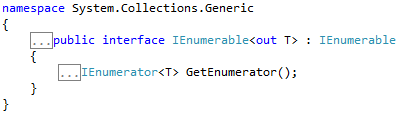
IEnumerable<T> is the base interface for collections in System.Collections.Generic namespace. IEnumerable<T> exposes the enumerator which supports iteration over a collection of a specified type. For non-generic types .NET has another interface called IEnumerable. See the difference between IEnumerable<T> and IEnumerableIEnumerable<T> has a single method GetEnumerator which you must implement when implementing the IEnumerable<T> interface. This returns a IEnumerator<T> object.


IQueryable<T> provides functionality to evaluate queries against a data source. This exists in System.Linq namespace. This inherits IEnumerable<T> interface thereby if it represents an query it can be enumerated. Enumeration forces associated expression tree to be executed.


Difference between IQueryable<T> and IEnumerable<T>
Both will give the ability for deferred execution but IQuerayable allows you to LINQ to SQL while IEnumerable does not. IEnumerable only allows LINQ to Object. IQueryable if possible will execute on database. 

AsEnumerable
Allows you to cast a specific type to its IEnumerable equivalent. In LINQ you can use this to run part of the query in SQL and the other part in memory as LINQ to Objects. One reason because when execute in memory we have more methods to work with than in database. (Ref)


AsQueryable
Converts IEnumerable to an IQueryable.

When exposing any of these interfaces to a client, the developer should design the API such that only the required details are exposed to the outside. 
Source - Stackoverflow
Also see questions for IEnumerable under stackoverflow

IEnumerable<T> has lot of extension methods. Check them here.

Provides a set of static methods for querying objects that implements IEnumerable<T>. This can be found under System.Linq namespace.

Enumerable.Empty<TResult>
Returns an empty IEnumerable<T>. 

Wednesday, January 1, 2014

Using IComparer, Comparer and IComparer in C#

IComparer

IComparer interface exposes a method to compare two objects. This interface comes under System.Collections namespace. You can use this with Array.Sort() method. To use with Generic classes you must use IComparer<T> interface.

You can check the example in MSDN documentation to see how to use IComparer with an Array.

IComparer<T>

This interface comes under System.Collections.Generic namespace. This is similar to IComparer. This interface is used with List<T>.Sort and List<T>.BinarySearch methods and provides a way to customize the sort order of a collection.

The StringComparer class implements this for String. 

IEqualityComparer<T>

Comparer<T>

This interface provides a base class for implementations of the IComparer<T> interface. 

It is recommended to use Comparer<T> instead of IComparer<T> 


Resources

Using IComparable in C#

In case you want to compare 2 objects for sorting purpose you can use this interface. IComparable defines a type specific comparison method. Value types and classes can implement this interface. 

Lets say you have a list of people and you want to sort it by age. You'll use Sort method comes with the list. Usually the Sort() method will use default comparer for the type specified by the generic argument, Here default comparer for Person. 


But it'll throw an error when trying to sort because Person does not have a comparer and it does not know how to sort them. Therefore you need to implement IComparable and its CompareTo method like below.


Now the sorting will happen successfully. Note that implementation of CompareTo(Object) must return a Int32. All numeric types such as Int32 and Double implements IComparable.


Resources

Useful Interfaces in .NET

IEnumerable<T>

Exposes the enumerator which supports iteration over a collection of a specified type. This interface can be found under System.Collections.Generic namespace. 

This is the base interface for collections in Collections.Generic namespace such as  List<T>, Dictionary<TKey, TValue> etc.. For non-generic .NET has IEnumerable.

IEnumerable<T> has a single method GetEnumerator which you must implement when implementing the interface. This returns a IEnumerator<T> object.


IEnumerable 

Just like its generic version, exposes an enumerator.


IComparable


IComparer

IDisposable


IQuerable


IEqutable


IList


IDictionary

IEqutable in C#

To do object comparisons you can use Object.Equals method. But this method could behave differently than you expected. Also it will have to do a cast to Object in order to perform the equality comparison which will result in a performance drop.

IEqutable<T> defines a generalized method which a value type or a class can implement to create type specific equality comparison. It contains a single method Equals. The IEqutable<T> interface is used by Collection objects such as Dictionary, List etc. in methods like Contains, IndexOf and Remove. 

When you implement IEquatable, you should implement IEqutable.Equals as well as Object.Equals(Object) method. When you implement IEqutable.Equals, runtime will use this only if you pass object with the same type. Otherwise it'll try to use Object.Equals method.

Using with Value Types
For a value type, you should always implement IEqutable<T> and override Object.Equals(Object) for better performance. Object.Equals boxes value types and relies on reflection to compare two values for equality. See SO answer for an implementation

With value types you also need to overload the equality (==) and inequality (!=) operators which is important to avoid boxing and unboxing in equality checking. You can use ReferenceEquals for this.

IEqutable<T>.Equals method
Indicates whether current object is equal to another object of same type. 

When to use IEqutable<T>

We know that IEqutable<T> is used by generic collections such as Dictionary and List. The IEqutable<T> implementation will require one less cast for  these classes and will be slightly faster than object.Equals method.

Also you can have explicitness of implementing IEqutable<T>


Read this article from CodeProject to get a good understanding

IEqualityComparer<T>
It is an object that performs comparison of two objects of type T. IEqutable<T> is for an object so that it can compare itself with another object. (See difference)

Resources
Powered by Blogger.


Software Architect at Surge Global/ Certified Scrum Master

Experienced in Product Design, Software Engineering, Team management and Practicing Agile methodologies.

Search This Blog

Facebook