Showing posts with label entity-framework. Show all posts

Friday, May 1, 2015

LINQ in Entity Framework

To retrieve lists from database you can use IEnumerbale<T> or IQueryable<T> interfaces. IQueryable allows you to do LINQ-to-SQL while IEnumerable<T> is LINQ-to-Objects. Both gives you the opportunity to do deferred execution. (Read this article for more).

In IEnumerable all objects matching the original query will be loaded to the memory from database. 

Above first and last LINQ statements will generate first SQL query while second LINQ expression will generate the second query below,

LINQ First and FirstOrDefault


LINQ Single and SingleOrDefault


LINQ Any
Note that Count will iterate all the records in the table while Any will stop at first record it finds. (source)

LINQ Count and LongCount

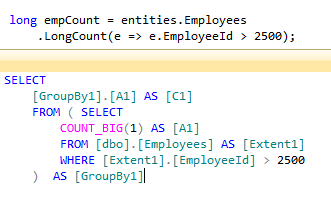

The difference between Count and Count_Big is latter returns bigint while count returns int. See more details on data types.

LINQ Contains


Group by

Tuesday, July 8, 2014

Introduction to Entity Framework

Entity Framework (EF) is an object-relational mapper (ORM) for .NET. Entity Framework can be used to work with relational data using domain-specific objects. Entity Framework eliminates need for data access code that programmers usually need to write. The codes you write with Entity Framework will be converted to SQL queries. 

You can view them using ((System.Data.Objects.ObjectQuery)result).ToTraceString(); 
ObjectQuery class is the base class for queries against a conceptual model. There's also the ObjectQuery<T> generic class. 

Architecture of Entity Framework


Above diagram shows the high-level architecture of the Entity Framework. Conceptual model contains model classes and there relationshps this is independent from the actual tables in the database. For details of other components in the above diagram see this.

You can also check Entity Framework Overview available in MSDN

Workflows

In Entity Framework there are 3 workflows developers can use to start with. They are Model First, Database First and Code first. All of these has its own pros and cons so understanding the differences correctly is important.

Model First

Using Model First approach developers can create the Database model using ORM designer in Visual Studio. Here the designer relies on the .edmx file designer to maintain the design specifics. 

The physical database will be then generated from the model.

Database First

Using this approach you can reverse engineer a model from an existing database. The classes are automatically generated from EDMX file. Read Entity Framework Database First Example for steps.

In the wizard for creating the model, you'll get checkboxes to select Pluralize or singularize generated object names option. Read more about it here.  

Code First

Create classes first and generate Database from the classes directly. No use of Entity designer at all. 

Choosing the suitable workflow

Understanding which workflow to use is important before you start developing data access applications using EF. 

http://blog.smartbear.com/development/choosing-the-right-entity-framework-workflow/
http://msdn.microsoft.com/en-us/library/vstudio/cc853327%28v=vs.110%29.aspx  

Data Persisting in Entity Framework

Entity Framework use Unit of Work pattern to persist data. 

Wednesday, May 7, 2014

Understanding IEnumerable and IQueryable in C#

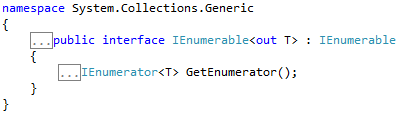
IEnumerable<T> is the base interface for collections in System.Collections.Generic namespace. IEnumerable<T> exposes the enumerator which supports iteration over a collection of a specified type. For non-generic types .NET has another interface called IEnumerable. See the difference between IEnumerable<T> and IEnumerableIEnumerable<T> has a single method GetEnumerator which you must implement when implementing the IEnumerable<T> interface. This returns a IEnumerator<T> object.


IQueryable<T> provides functionality to evaluate queries against a data source. This exists in System.Linq namespace. This inherits IEnumerable<T> interface thereby if it represents an query it can be enumerated. Enumeration forces associated expression tree to be executed.


Difference between IQueryable<T> and IEnumerable<T>
Both will give the ability for deferred execution but IQuerayable allows you to LINQ to SQL while IEnumerable does not. IEnumerable only allows LINQ to Object. IQueryable if possible will execute on database. 

AsEnumerable
Allows you to cast a specific type to its IEnumerable equivalent. In LINQ you can use this to run part of the query in SQL and the other part in memory as LINQ to Objects. One reason because when execute in memory we have more methods to work with than in database. (Ref)


AsQueryable
Converts IEnumerable to an IQueryable.

When exposing any of these interfaces to a client, the developer should design the API such that only the required details are exposed to the outside. 
Source - Stackoverflow
Also see questions for IEnumerable under stackoverflow

IEnumerable<T> has lot of extension methods. Check them here.

Provides a set of static methods for querying objects that implements IEnumerable<T>. This can be found under System.Linq namespace.

Enumerable.Empty<TResult>
Returns an empty IEnumerable<T>. 

Monday, February 24, 2014

Data Validation in Entity Framework

Validating data is important to make sure bad data is not getting into the system causing unnecessary troubles. When developing applications using Entity Framework, you can use features in .NET and Entity Framework to ensure only valid data will flow through it. Here we'll see what features we can use with Entity Framework to do our job

Using Data-Annotations

Data-Annotations are attributes you can add to property or a class. Data-Annotations are not a feature comes with Entity Framework. It's a feature of MVC. You must add System.ComponentModel.DataAnnotations to use this. 


IValidatableObject

Its is an interface which can be applied to a class. 

ValidateEntity


DbUpdateException

Exception throws by Entity Framework when updating to the database gets fails

References


updated November 2014

Wednesday, January 1, 2014

Relationships in Entity Framework

In Entity Framework, an entity can be related to other entities through an association (relationship). The relationship may be governed by a referential constraint, which describes which end in the relationship is a principal role and which is a dependent role. Navigation properties provide a way to navigate an association between two entity types.

Every object can have a navigation property for every relationship in which it participates. Navigation properties allow you to navigate and manage relationships in both directions, returning either a reference object (if the multiplicity is either one or zero-or-one) or a collection (if the multiplicity is many). You may also choose to have one-way navigation, in which case you define the navigation property on only one of the types that participates in the relationship and not on both.

when working with 1-to-1 or 1-to-0..1 relationships, there is no separate foreign key column, the primary key property acts as the foreign key and is always included in the model. When foreign key columns are not included in the model, the association information is managed as an independent object. Relationships are tracked through object references instead of foreign key properties. This type of association is called an independent association.

Difference between Navigation property and an association
Association acts as a foreign key while, navigation property allows you to navigate between entities.


Entity Framework - Code First

This article explains some of the features in Code First and Entity Framework in general. You can follow the tutorial series from asp.net to have some hands on experience on this.

Also checkout  this entry level tutorial

Creating Models

ID Property
When you create a model class, if you define an ID property it'll become the primary key column of the corresponding database table. Also by default the Entity Framework interprets a property that's named ID or classnameID as the primary key.

Navigation property
Navigation properties hold other entities that are related to this entity. Navigation properties are typically defined with virtual so that they can take  the advantage of lazy loading. You can put foreign key as well as the navigation property in the model class.

A property is interpreted as a foreign key if its named <navigation property name><primary key property name>

DatabaseGenerated Attribute
Specify how database generates value for a property. Let database to generate primary key. This attribute exists in System.ComponentModel namespace

You can find more code first conventions on MSDN.  

Database Initializers

see codeguru , google search ,
You can populate test data using Seed method. don't forget to update the web.config as well. 

Database Initializers in Code First
- in Web.config
- in Global.asax Application_Start

Security Considerations for Entity Framework

General Security Considerations

Use only trusted data source providers
Encrypt the connection to protect sensitive data
Secure the connection string
Run applications with minimum permissions
Do not install untrusted applications
Restrict access to configuration files

For Queries

Prevent SQL Injection attacks
Prevent very large result sets
Avoid returning IQueryable results when exposing methods to clients


For Entities

Do not share an ObjectContext across application domains
Prevent type safety violations
Handle exception

For ADO.NET metadata

Do not expose sensitive information through logging
Do not accept MetadataWorkspace objects from untrusted sources
 
 
http://msdn.microsoft.com/en-us/library/vstudio/cc716760%28v=vs.100%29.aspx

Tuesday, December 24, 2013

Loading Entities in Entity Framework

In Entity Framework you can load data in few different ways,
  • Eager loading
  • Lazy loading
  • Explicit loading

Eager Loading

Here query for a one type of entity also loads other related entities as a part of the query. You can load related entities by using Include method. Include is an extension method.

        List<Employee> employees = context.Employees
            .Include(e => e.Courses)
            .ToList();


        List<Employee> employees2 = context.Employees
            .Include("Courses")
            .ToList();

This will generate a left outer join (See diagram for types of joins) thereby, if no record found it will return null for them.


You can also load multiple levels of related entities. In eager loading, there won't be multiple database calls.  It retrieves all data at once. The downside is, it creates large nested queries which has a performance impact. Therefore avoid using multiple Include statements in a single LINQ query. See Performance considerations. See SO Questions.

Lazy Loading

Loads related entities automatically the first time the property referring the entity is accessed.

Lazy loading and serialization doesn't get together well. Most serializers work by accessing each property of an instance of a type. This property access triggers lazy loading. Therefore it is recommended to turn off lazy loading before serializing an entity. 


Explicit loading

Even with lazy loading off, you can load related entities lazily. By explicitly calling Load method.

References

Saturday, December 21, 2013

DbContext in Entity Framework

Entity Framework, commonly known as EF (latest being EF Core) is a ORM tool which is introduced and maintained by Microsoft.

In EF, DbContext Is the primary class which is used to interact with data as objects. DbContext is often referred to as context. The context class manages entity objects during run time, which includes populating data from database, change tracking and persisting data back to database.  

What exactly is DbContext class?

DbContext is actually a simplified alternative to ObjectContext. Its like a wrapper over ObjectContext. DbContext is the preferred way to interact with Entity Framework. (Is DbContext same as DataContext?). You can get ObjectContext from DbContext using the following code.


DbContext is most commonly used with derived type that contains DbSet<Entity> properties for the root entities of the model. These sets are automatically initialized when a derived type of DbContext is created. You can override protected method OnModelCreating to modify these models. (See Code First Building Blocks).

What is DbSet?

DbSet represents a table or a view in the database. DbSet(TEntity) cannot be constructed publicly. It can be instantiated only through DbContext instance. See DbSet and DbContext. You will be using DbSet to access, insert, update or delete your table data.

Lifetime of DbContext starts when object is created and ends when the object is disposed or garbage collected. By default context manages connections to the database. The context opens and closes connections as necessary. 

DbContext is not thread safe.You can still create multi-threaded applications as long as instance of same DbContext class is not tracked by multiple contexts at the same time. 

Here's some insight of DbContext class. You can find the source code in codeplex.

DbModelBuilder
Used to map CLR classes to database schema. This is mainly used in Code First approach. MSDN


Timeout in Entity Framework
Entity Framework operations have timeouts. The timeout duration is defined by underlying connection providers. You can set the connection timeout in Entity Framework connection string but there is a known bug in MySQL. Therefore you can set timeout in data context.

this.context.Database.CommandTimeout = 180; 


Overridable members in DbContext

Dispose : Usually you don't need to do this. see this article
SaveChanges and SaveChangesAsync : EF6 onwards 
ValidateEntity and ShouldValidateEntity : see this 


Change Tracking POCO entities

In EF, you can track POCO entity changes through change-tracking proxy object or through a snapshot.

When change tracking with proxies, tracking changes in object graph is automatically done by EF. You can disable proxy creation this using below command. Beware that even if proxy creation is enabled, EF will create proxy classes only if the requirements for proxy creation is satisfied.

entities.Configuration.ProxyCreationEnabled = false;

Proxies are created for lazy loading as well. Not only for change tracking

http://stackoverflow.com/questions/7111109/should-i-enable-or-disable-dynamic-proxies-with-entity-framework-4-1-and-mvc3
https://msdn.microsoft.com/en-us/library/vstudio/dd456848(v=vs.100).aspx
http://stackoverflow.com/questions/26355486/entity-framework-6-audit-track-changes
http://www.entityframeworktutorial.net/change-tracking-in-entity-framework.aspx
http://www.c-sharpcorner.com/UploadFile/ff2f08/working-with-change-tracking-proxy-in-entity-framework-6-0/

Attaching and Detaching Entities

Objects that are attached to ObjectContext can be tracked and managed by ObjectContext. When your object is detached, it won't be tracked by the object context. By default if you execute a query inside a ObjectContext, entities are attached to object context. 

You can detach entities by one of the options below,

Using MergeOption.NoTracking enumeration or AsNoTracking
See examples here, here and here. Also beware about possible performance issues as mentioned here and here. See advantages of using AsNoTracking here and here.

ObjectContext.Detach method
This method removes the object from ObjectStateManager. Disables change tracking and identity resolution. See the example below,

https://msdn.microsoft.com/en-us/library/vstudio/bb896271(v=vs.100).aspx
http://stackoverflow.com/questions/4168073/entity-framework-code-first-no-detach-method-on-dbcontext

See Working with DbContext (MSDN)
See example files used in this article in this gist

Wednesday, November 13, 2013

Other resources for Entity Framework


Difference between Eager loading and Lazy loading


http://stackoverflow.com/questions/3485317/entity-framework-4-single-vs-first-vs-firstordefault


Bulk Inserting in Entity Framework
http://stackoverflow.com/questions/5940225/fastest-way-of-inserting-in-entity-framework
http://stackoverflow.com/questions/6107206/improving-bulk-insert-performance-in-entity-framework

...............

  • By default, EF interprets a property that's named ID or classnameID as the primary key
    • using ID without classname makes it easier to implement inheritance in the data model
  • Navigation properties are typically defined as virtual so they can take advantage of certain EF functionality such as lazy loading. 
  • DatabaseGenerated is an attribute you can define on primary key. It says you'll manually enter the primary key rather than Database generating it.
  • The main class that coordinates EF functionality for a given data model is the database context class.
    • You create this class by deriving from System.Data.Entity.DbContext class
    • In your code you specify which entities are included in the data model

    • This code creates a DbSet property for each entity set. In EF, an entity set typically corresponds to a database table, and an entity corresponds to a row in the table.
    • Above, SchoolContext is the name of the connection string you define in Web.config
      • You can also pass the connection string itself (link)
      • If you don't pass anything to base, EF assumes the connection string name is the same as the class name
    • You can write a Seed method for EF to generate data


Useful methods

ObjectContext.SaveChanges()

Persists all updates to the data source and resets change tracking in the object context. Returns no. of objects in an added, modifled or deleted state when SaveChanges was called

link1, link2, link3


Configuring Entity Framework
You can configure entity framework options from the config file. Starting from EF 6 you can use Code based configurations.

sources

Saturday, January 26, 2013

Execution Sequence of Entity Framework

When talking about Entity Framework its important to understand the operations happening,

Loading metadata
Happens only once in each application domain. Model and mapping metadata used by EF is loaded into MetadataWorkspace.

Opening the database connection
EF opens and closes database connection as needed. 

Generating views
This is usually a costly operation

Preparing the query

Executing the query

Loading and validating types

Tracking


Materializing the objects

Monday, December 31, 2012

Saturday, December 29, 2012

What you need to know about performance in Entity Framework


http://msdn.microsoft.com/en-us/data/hh949853.aspx 

Mapping Views
Mapping views are set of SQL statements that represents the database in an abstract way, which are also part of the metadata.
link1, link2

Query execution
Deferred vs. Immediate execution
Client side execution of LINQ queries
Query and mapping complexity
Mapping complexity
Query complexity
Relationships
Query paths
Saving changes
Distributed Transactions


Strategies for Performance improvement

Pre-generate views
Consider using NoTracking merge option for queries
Return the correct amount of data
Limit the scope of ObjectContext
Consider opening db connection manually.

Extra

  • In EF its best to understand how query execution happens 
  • Data Source is the one which provides connection pooling facility. Not the Entity Framework. The .NET provider for SQL Server provides support for Connection Pooling
  • In previous versions of EF (before 6) there was a performance problem when using Contains. This has been fixed now.

https://msdn.microsoft.com/en-us/data/hh949853.aspx
http://www.asp.net/web-forms/overview/older-versions-getting-started/continuing-with-ef/maximizing-performance-with-the-entity-framework-in-an-asp-net-web-application


http://www.asp.net/whitepapers/aspnet-data-access-content-map#gettingstarted


Saturday, June 16, 2012

Saturday, August 27, 2011

Transactions in Databases

Transaction is databases is executing set of database instructions in a sequence which should be accomplished together. Transactions have following properties which are known as ACID (wiki).
  • Atomicity : Ensure all operations are completed successfully or in a failure, all operations are rolled back to its previous state
  • Consistency : Ensure database properly changes state upon a successful transaction completion
  • Isolation : Ensure transactions are operate independently 
  • Durability : Ensure result or effect of a committed  transaction persist in a case of a system failure

Transactions in Entity Framework

Whenever you execute SaveChanges(), the framework will wrap that operation in a transaction. Starting with EF6, Database.ExecuteSqlCommand() by default wrap the command in a transaction if one was not already present. Entity framework does not wrap queries in a transaction.

Read below articles for more information Working with Transactions (Data Developer Center)
Managing connections in Entity Framework (Visual Studio)
Using Transactions or SaveChanges (SO)


Transactions in SQL Server

Implicit Transaction 
http://dba.stackexchange.com/questions/43254/is-it-a-bad-practice-to-always-create-a-transaction
http://www.codeproject.com/Articles/4451/SQL-Server-Transactions-and-Error-Handling
http://stackoverflow.com/questions/10153648/correct-use-of-transactions-in-sql-server-2008
http://www.tutorialspoint.com/sql/sql-transactions.htm
http://www.dotnet-tricks.com/Tutorial/sqlserver/c2XF120412-SQL-Server-Transactions-Management.html


SAP
https://help.sap.com/saphelp_gateway20sp08/helpdata/en/41/7af4bca79e11d1950f0000e82de14a/frameset.htm
Powered by Blogger.


Software Architect at Surge Global/ Certified Scrum Master

Experienced in Product Design, Software Engineering, Team management and Practicing Agile methodologies.

Search This Blog

Facebook