Showing posts with label iis. Show all posts

Saturday, May 9, 2015

Application Pools in IIS

Application pool is a way to manage multiple web applications under IIS server. App pools allows you to isolate applications with different security controls from one another. It helps you to manage your applications separately. 


IIS Worker Process
Is a Windows process (w3wp.exe) which runs web applications. It is responsible for handling requests for a specific application pool. App pool can contain more than one worker process. This is known as web farm or web garden. Read here

Application Pool Recycling
To make the application running smooth without memory leaks you need  to recycle the application pool. Any code which failed to implement IDisposable would run finalizers which will release resources.

Identity

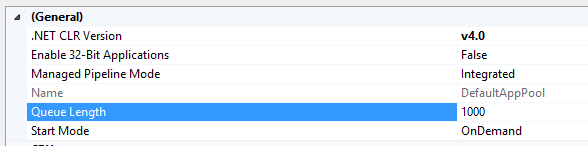
Application Pool Settings (General)
  • .NET CLR Version
    • This should correspond to appropriate version of .NET framework version of your application
  • Managed Pipeline Mode
  • Queue Length
    • Max No. of requests HTTP.sys will queue for the app pool. When queue is full you'll get 503 "Service Unavailable" error
  • Start Mode : OnDemand or Always Running. See (SimpleTalk - Speeding up your application with Auto-Start feature)

Resources

Wednesday, January 1, 2014

C# - Project Structure and MSBuild

Project structure for MVC Application
This is a typical project structure you'll get when you create a MVC application from Visual Studio 2013.

App_Start has Configurations to initialize from Global.asax

Content has styling files and Scripts folder has all the Script files (JavaScript etc.)

Views folder has Views in MVC with a separate Web.Config file for views.

packages.config is the file for Nuget packages. see SO.

Web.config file has all configuration information about the application.

MSDN - MVC Framework and Application Structure


Project structure for Windows Forms Application


This is a sample project structure for a windows forms application (got from CodeProject). 


MSBuild (Microsoft Build Engine)

It is a build too. MSBuild does not depend on Visual Studio but Visual Studio depends on MSBuild. You can run MSBuild even from the command window.

MSBuild Project File

Is a XML file. For C# it has the extension of .csproj.

Basic elements,

Items #
Inputs into the build system, typically represents files
You can put items inside ItemGroup element

Properties #
name value pairs

Tasks

Targets

References
http://msdn.microsoft.com/en-us/library/dd393573.aspxhttp://stackoverflow.com/questions/6446361/what-does-the-csproj-file-do
http://www.asp.net/web-forms/overview/deployment/web-deployment-in-the-enterprise/understanding-the-project-file
http://www.asp.net/web-forms/overview/deployment/web-deployment-in-the-enterprise/understanding-the-build-process

Troubeshooting IIS

Load Balancing

Distributes workload across multiple computing resources. Load balancing aims to optimize resource use.


IIS - HTTP Load Balancing using Application Request Routing

Also look at this video


Configuring Web Farm in IIS
https://www.youtube.com/watch?v=HSvbjfsitmU


Resources
http://en.wikipedia.org/wiki/Load_balancing_%28computing%29
https://www.google.com/search?q=load+balancing&ie=utf-8&oe=utf-8

Saturday, November 3, 2012

Introduction to IIS

IIS is a web server software developed by Microsoft. IIS provides a request processing architecture. IIS includes,
  • A customizable web server engine by adding or removing modules
  • Windows Process Activation Service (WAS) which enables sites to use protocols other than HTTP and HTTPS
  • Integrated request processing pipelines from IIS and ASP.NET

Components in IIS

Performs important functions in IIS. Some components of IIS are protocol listeners (HTTP.sys) and services such as World Wide Web publishing service (WWW Service) Windows Process Activation Service (WAS).

Protocol listeners
These receive protocol specific requests, send them to IIS for processing and returns responses. One example is HTTP.sys HTTP listener which listens to both HTTP and HTTPS. You can also use protocol listeners for WCF etc.

Windows Process Activation Service (WAS)

By default IIS only supports HTTP protocol. You can use WAS component to enable other protocols. Also see http://www.iis.net/learn/manage/provisioning-and-managing-iis/features-of-the-windows-process-activation-service-was

Following video will show you how to host WCF services in IIS.

Pipelines

In IIS 7 there are 2 request processing pipelines. Classic and Integrated pipeline. Classic was the only existed in IIS 6 and below. With Integrated pipeline it is tightly integrated as ASP.NET request pipeline. (SO)

Managed code modules that implements IHttpModule has access to all events in request pipeline. In IIS6 and IIS7 classic mode, ASP.NET request pipeline was separate from Web server pipeline. But in IIS 7, it is a unified pipeline which handles the requests. 

In ASP.NET application life cycle, firstly 

  • The ApplicationManager and HostingEnvironment objects gets created
  • Application objects such as HttpContext, HttpRequest gets created
  • HttpApplication object is created (if one doesn't exist to use) and assigned to the request


Automatic Deployment using Microsoft Web Deploy
http://weblogs.asp.net/scottgu/automating-deployment-with-microsoft-web-deploy

Resources


Powered by Blogger.


Software Architect at Surge Global/ Certified Scrum Master

Experienced in Product Design, Software Engineering, Team management and Practicing Agile methodologies.

Search This Blog

Facebook